The management systems module introduces two important improvements that make it easier to track objectives and manage documentation across your ISO projects.
Objectives and indicators shared across projects
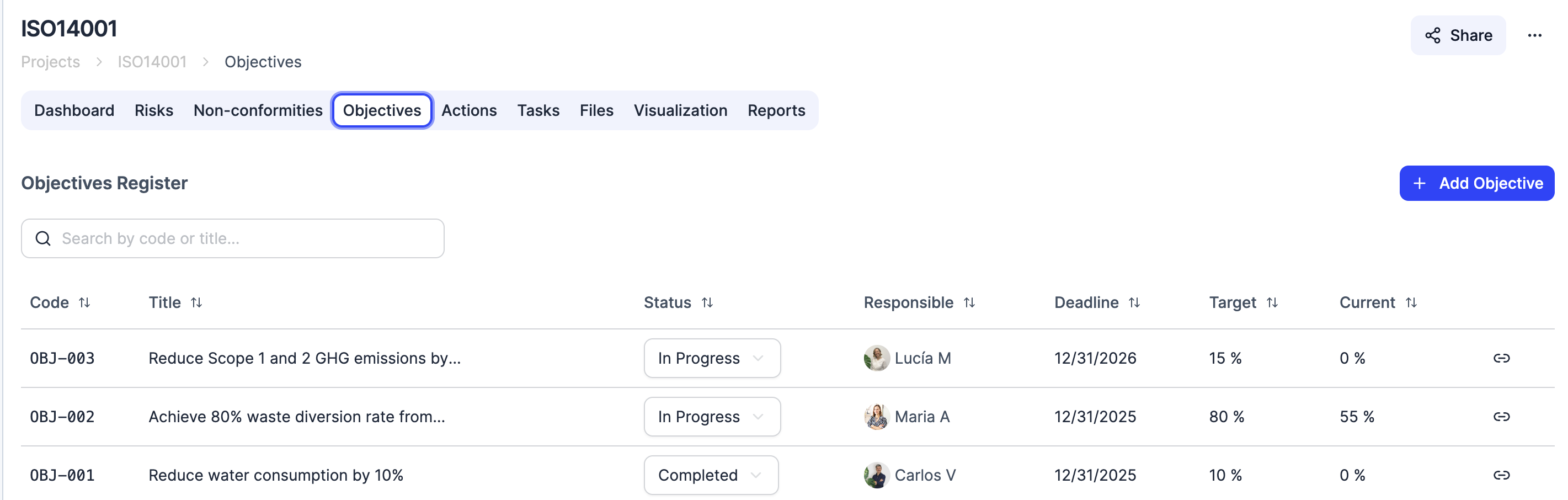
The management systems module now includes an objectives and indicators section. You can define your organization’s quality and environmental objectives and track progress with indicators that include target and current values.
The key highlight is that objectives are managed at the organization level and can be linked to multiple ISO projects at once. For example, an energy reduction objective can be associated with both your ISO 14001 and ISO 9001 projects. When you update an indicator, the change is reflected across all linked projects, eliminating duplicates and ensuring data consistency.
This feature allows you to centralize your organization’s continuous improvement strategy without maintaining separate records in each project. The people responsible for each management system can consult the same set of objectives, making it easier to coordinate across teams and simplifying both internal and external audits.
Evidence attachments on nonconformities
You can now attach files directly to nonconformities: photographs, documents, inspection reports, or any file that supports the finding.
All evidence stays centralized alongside the record, accessible to the team and ready for any audit. To attach files, use the attachments section in each nonconformity form.
This improvement streamlines the documentation process and eliminates the need to store evidence in external folders or separate tools. During an audit, all relevant information is available in one place, reducing preparation time and improving traceability for each finding.
Both improvements are available in all management systems projects. Head to your ISO project to start using them.