Introducing automatic distance calculation for bulk employee commuting imports.
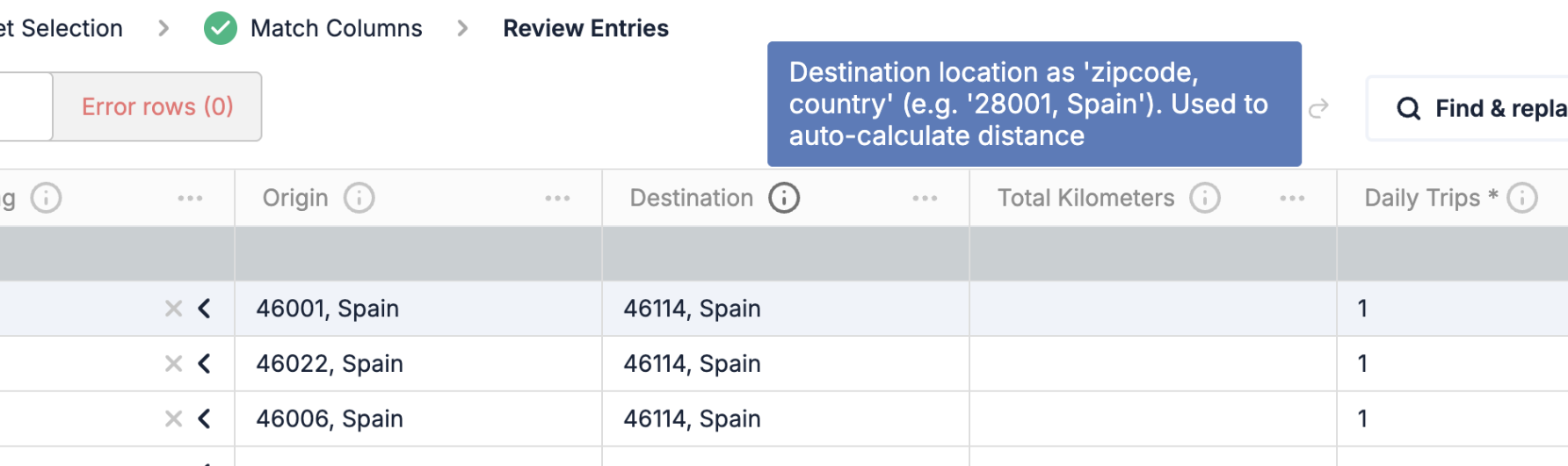
When importing commuting data via CSV, you no longer need to know the exact distance between each employee’s origin and destination. Simply provide the origin and destination (e.g., zip code and country) and the system will automatically calculate the kilometers using Google Maps.
How does it work?
-
If you provide kilometers in the CSV, they will be used as-is
-
If you leave the kilometers field empty but include origin and destination, the distance is calculated automatically
-
Origin, destination, and calculated kilometers are displayed in each period’s details Benefits:
-
Save time by eliminating manual distance lookups
-
More accurate emissions calculations based on real route data
-
Simpler and faster bulk upload process This feature is available in the Commuting section within the Employees module, when using the bulk import option.
Related Articles
- Assumptions and comments on LCA blocks
- Bulk Invoice Deletion - now available!
- Bulk purchase upload for holding organizations
Frequently asked questions (FAQs)
How can companies calculate employee travel distances for annual sustainability reporting?
Companies can provide each employee's origin and destination in the commuting upload and let Dcycle calculate the route distance automatically. The resulting kilometres are stored with the commuting record, so the company can apply the appropriate emission factor and reuse the evidence in its annual environmental reporting.