

Sustainability

Emission factor details

Almudena Gómez-Plata avatar Almudena Gómez-Plata · · 1 min read
Emission factor details

Until now, understanding why a calculation landed on a given result usually meant piecing together information from different places. Not anymore.

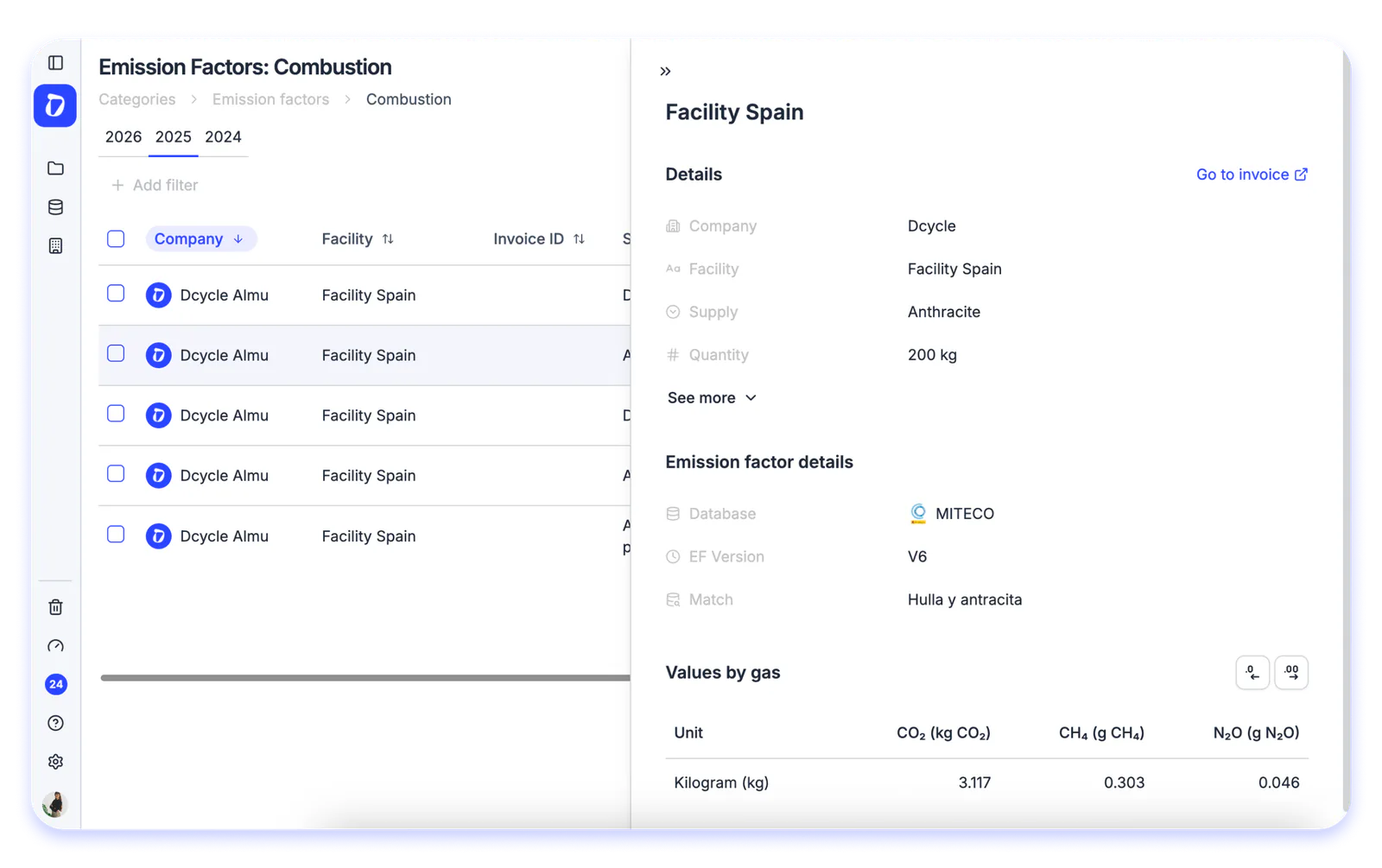
You can now open the full detail of any emission factor without leaving the platform. Just go into a category within Emission Factors and click on any row, a panel opens up with all the traceability behind that figure.

There you’ll find the company and facility involved, the quantity, the database and EF version applied, the match used, and the values by gas (CO₂, kg CO₂e). The whole story behind a calculation, at a glance and ready for audits.

Find it in: Data → Emission Factors → select a category → click any row
Product UpdateEmission Factors
30-minute demo

See it with your own data.

Thirty minutes with our team. We show you how your data would come in, and what you would get out.

See Dcycle in action
  • No commitment
  • With your data
  • In your language

What your session looks like

  1. 01 You tell us what you’re being asked forCustomers, auditors or banks: what data and by when. 0–5 min
  2. 02 We show how your data comes inInvoices, ERP, suppliers: on an example close to yours. 5–20 min
  3. 03 You leave with a planWhat to automate first and how much time you save. 20–30 min
With someone from the team who then supports you




